
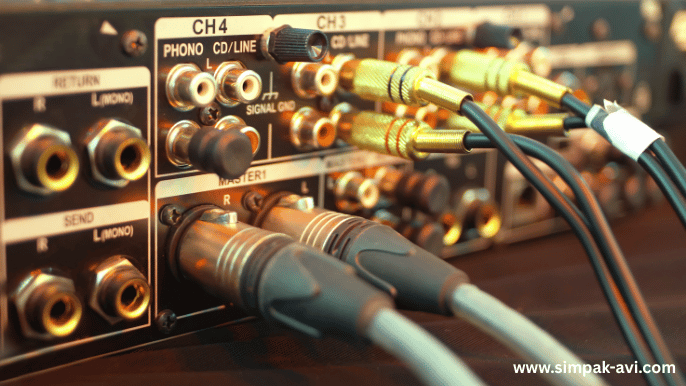
How to Choose the Right Audio Cable for Your Sound System?
When it comes to audio setups, people often spend money on good speakers, amplifiers, or mixers — but ignore the most important part: the cable. Yes, that one small wire can make or break your sound. In Indian homes, we’ve all done some jugaad — connecting a laptop to a speaker with a random AUX cable or using an old RCA wire from the 90s. But if you're serious about sound quality — whether it’s for home theatre, college fest, DJ setup, or even a small studio — then you need to choose the right audio cable for your sound system. It’s not just about “what fits where” — it’s about using the right connector, the right length, and the right build for the job. In this guide, I’ll break down popular options like AUX, RCA, XLR, 6.35mm jack, and help you understand which cable is perfect for your setup — in plain Indian language.
Understanding Common Audio Cable Types
Let’s start from the basics. The 3.5mm AUX cable is something you’ll find everywhere — in headphones, phones, car stereos, and small speakers. It’s easy to use, but not perfect for professional setups. Then you have RCA cables, the red and white plugs used with TVs, DVD players, and older sound systems — very common in Indian homes. For professional sound setups like stage events or studios, we use XLR cables — known for clear sound and long-distance performance. If you’ve ever seen a mic connected to a speaker on stage, that’s usually XLR. Finally, there’s the 6.35mm jack (¼ inch), many times used with electric guitars, keyboards, mixers, and amplifiers. Each of these cables is made for a specific type of connection — so using the wrong one can minimize sound quality or simply not work at all.
Balanced vs Unbalanced Cables – What’s the Real Deal?
This is where most people get confused. In simple terms, balanced cables (like XLR) take sound signals in a way that blocks noise and disturbance. That’s why they are used in concerts and studios. On the other hand, unbalanced cables (like AUX and RCA) are okay for short distances — like connecting a phone to a speaker. But if your cable runs longer than 5-6 feet, and especially if other electronic items are nearby, you’ll start hearing buzzing or humming. That’s because unbalanced cables pick up interference. So if you’re doing something serious — like connecting a mic to a mixer, or a keyboard to speakers for a school performance — balanced is the safer choice.
Match the Cable to Your Device – No More Trial & Error
Let’s say you’ve got a laptop, a Bluetooth speaker, and an old amplifier. Each device has different ports. For example, laptops normally have a 3.5mm AUX port, while amplifiers can need RCA or a 6.35mm jack. So randomly picking a cable never works. You have to see both ends — source and output — and pick the right combination. Want to connect your phone to an older home theatre? You’ll probably need a 3.5mm AUX to RCA. Connecting a mic to a speaker? You need an XLR male to female. Setting up for the college farewell night? A Phono 6.35mm to XLR cable will come in handy. In short — look at the ports, match the connectors, and don’t assume one cable fits all.
Where Do We Usually Go Wrong? Common Indian Mistakes
A lot of people in India do something like this — they pull out an old AUX cable, connect it from laptop to speaker, and wonder why the sound is too low or noisy. Or they try to connect a mic using a 3.5mm-to-3.5mm wire and complain it “doesn’t work.” These are not cable problems — they are wrong cable problems. Another issue is using cheap local cables from electronics markets that stop working in a few months. Always go for proper connectors, gold-plated if possible, and never force a jack that doesn't fit. It might damage the port — and trust me, getting a laptop audio jack repaired is expensive and not worth the risk.
Choosing the Right Adapter
In many situations, you might not find a direct cable for your needs. That’s when adapters help. For example, if you want to convert AUX to XLR, there are small adapters for that. But remember — not all adapters work well. Passive adapters (without power) don’t change signal levels, so your mic might not sound clear when used with AUX output. For proper sound quality, use active converters when needed. And never connect three adapters in a row just to “make it fit” — that’s asking for trouble. Try to buy the correct cable with the right ends instead of relying on adapters as a permanent solution.
Length, Material & Durability – Don’t Ignore These
Cable quality matters. Don’t go for the ₹50 cable from your local shop just because it “fits.” Good cables use oxygen-free copper (OFC), which delivers better signal. Shielding (like foil or braided shields) protects the sound from nearby interference — especially useful in rooms with lots of electronics. Keep cables short when possible. A 1.5 to 2 metre cable is enough for home use. For longer distances (like events), use XLR cables — they’re designed for it. Also, look for cables with thick, flexible jackets — they last longer and don’t break from regular bending or wrapping.
Conclusion: Choose Smart, Enjoy Great Sound
So the next time you’re connecting any audio system — be it your TV, phone, speaker, mic, or mixer — don’t just go by trial and error. Take a few minutes to check the ports, understand the type of sound setup you want, and choose a proper audio cable. It’ll save you from noise issues, poor sound, or damaged devices. In India, where we often reuse old equipment and have a mix of local and branded products, knowing your cables can save both time and money. Whether it’s an AUX, RCA, XLR, or Phono — pick it right, plug it right, and enjoy the sound the way it’s meant to be heard.
FAQ’s
1. What’s the most commonly used audio cable in Indian homes?
Usually, it's the 3.5mm AUX cable — used for connecting phones, laptops, and speakers. It’s good for short-distance use and basic setups.
2. Is XLR better than AUX or RCA?
Yes, XLR cables are stable, so they minimize noise and are best for professional setups, long cables, and microphones.
3. Can I use an AUX to RCA cable for a TV connection?
Yes, if your TV has an AUX out and your sound system uses RCA in, a 3.5mm to RCA cable works well for casual listening.
4. What’s better for instruments — RCA or 6.35mm?
For musical instruments like guitars or keyboards, 6.35mm mono or stereo cables are perfect, as they handle higher signals better than RCA.